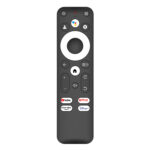


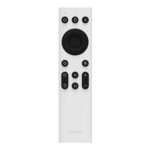
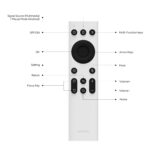
Wanbo Projector Remote with IR Control Compatible with Mini Pro, T2 Max, X5, Mozart 1, X2 Max.
R83.11
In stock
Shipping & Delivery
All orders are processed within 12-24 hours.
Delivery Charges
Our couriers operate Monday to Friday from 8 am to 5 pm.
Delivery costs will be quoted separately based on your location.
Free shipping on deliveries over R5000.
Delivery Time Frames:
- Central Cape Town and surrounds 3 to 7 working days
- National (all major cities) 3 to 7 working days
- Regional (all other areas) 5 to 7 working days
Can I track my order?
Once your order has been assigned to the courier, an email with tracking information will be sent.
You can track your order here
Infrared (IR) Control | Wide Wanbo Projector Compatibility | Dedicated Shortcut & Focus Keys | Mute Key | Mouse Mode | White
Quick Specs
- Control your Wanbo projector reliably over a simple infrared (IR) connection
- Adjust projection modes, focus and more with dedicated shortcut keys
- Silence audio instantly with a dedicated mute key
- Navigate menus easily with arrow and multi-function keys, plus mouse mode
- Pair it with a wide range of Wanbo projectors, from the Mini Pro to the T4
Reliable Infrared Control for Your Wanbo Projector
This genuine Wanbo IR remote control gives you simple, dependable command of your projector over a reliable infrared (IR) connection. It’s widely compatible with a broad range of Wanbo projectors — including the Mini Pro, T2 Max, X5, Mozart 1, X2 Max, X1, Dali 1, T2R and T4 — making it the perfect replacement or spare for homes and businesses across South Africa.
Quick Access to the Controls You Use Most
Designed for effortless everyday use, the remote puts essential functions right at your fingertips. Dedicated shortcut keys let you quickly adjust projection modes, focus and other frequently used settings, while arrow and multi-function keys make navigating menus simple. A dedicated mute key lets you instantly silence the audio without interrupting your viewing.
Streamlined, Efficient Operation
Built-in mouse mode makes it easy to point and select on screen, and the handy ‘Apply Shortcut Keys’ feature lets you rapidly execute common commands for a smoother, faster experience. Lightweight and intuitive, it’s a straightforward way to get the most from your Wanbo projector day to day.
FEATURES:
- Reliable infrared (IR) connectivity for seamless projector control
- Dedicated shortcut keys for projection modes, focus and other frequently used functions
- Dedicated mute key to instantly silence audio
- Arrow shortcut keys and multi-function keys for easy navigation
- Built-in mouse mode button
- ‘Apply Shortcut Keys’ feature for rapid execution of common commands
- Widely compatible with Wanbo Mini Pro, T2 Max, X5, Mozart 1, X2 Max, X1, Dali 1, T2R and T4 projectors
SPECIFICATIONS:
- Type: IR remote control
- Control Method: Infrared (IR)
- Compatible Models: Wanbo Mini Pro, T2 Max, X5, Mozart 1, X2 Max, X1, Dali 1, T2R, T4
- Mouse Mode Button: Yes
- Mute Key: Yes
- Multi-Function Keys: Yes
- Arrow Shortcut Keys: Yes
- Focus Shortcut Key: Yes
- Voice Function: No
- Colour: White
WHAT’S IN THE BOX:
- Wanbo IR Remote Control (Mini Pro | T2 Max | X5 | Mozart 1 | X2 Max) x1
Why Wanbo?
Wanbo is a popular projector brand known for accessible, feature-rich home entertainment. This official IR remote keeps your Wanbo projector easy to control — a simple, reliable accessory for any Wanbo owner in South Africa, whether you’re replacing a lost remote or keeping a handy spare.
All orders are processed within 12-24 hours.
Delivery Charges
Our couriers operate Monday to Friday from 8 am to 5 pm.
Delivery costs will be quoted separately based on your location.
Free shipping on deliveries over R5000.
Delivery Time Frames:
- Central Cape Town and surrounds 3 to 7 working days
- National (all major cities) 3 to 7 working days
- Regional (all other areas) 5 to 7 working days

Can I track my order?
Once your order has been assigned to the courier, an email with tracking information will be sent.
You can track your order here
QUESTIONS OR FEEDBACK:
Please contact us at info@techthat.co.za or contact us here. Alternatively, you can also Call or WhatsApp us.
Where do you source products from?
Our products are sourced from local businesses all over South African. We believe in quality products and services thus only stock the best of the best.
Payment information?
Customers can make payment via Payfast. Payfast is one of the largest payment gateways in South Africa. Through PayFast we offer safe and secure payment methods from which you can select: Credit and cheque cards. (Payfast contact details: support@payfast.co.za, 021 300 4455)
Do we do refunds?
Please see our Delivery and Return Policy
Local shipping?
Please see our Delivery Policy
Related products


UGREEN USB-C/USB-A Card Reader
R196.44